Mar 2, 2016

Call Stored Database Function in ADF

Sometimes we need to call stored database function in ADF application.

Note :- Try to call stored database function in ApplicationModuleImpl Class or in ViewObjectImpl.

Use below method to call stored function.


import java.sql.CallableStatement;
import java.sql.SQLException;
import java.sql.Types;
import oracle.jbo.JboException;

/**Method to call Database function
     * @param sqlReturnType (Return type of Function)
     * @param stmt (Function Name with Parameters)
     * @param bindVars (Parameter's Value)
     * @return
*/

    protected Object callStoredFunction(int sqlReturnType, String stmt, Object[] bindVars) {


        CallableStatement st = null;
        try {
      //Creating sql statement
            st = this.getDBTransaction().createCallableStatement("begin ? := " + stmt + ";end;", 0);

      //Register dataType for return value
            st.registerOutParameter(1, sqlReturnType);
     //Pass input parameters value
            if (bindVars != null) {

                for (int z = 0; z < bindVars.length; z++) {

                    st.setObject(z + 2, bindVars[z]);

                }
            }

            st.executeUpdate();
      //Finally get returned value
            return st.getObject(1);
        } catch (SQLException e) {
            throw new JboException(e.getMessage());
        } finally {
            if (st != null) {
                try {
                    st.close();
                } catch (SQLException e) {
                      e.printStackTrace();
                }
            }
        }
    }


Use above callStoredFunction method in a method in Impl class and pass parameter.


public String callFunction(Integer EmployeeId){

    String EmpNm =null;


    Object obj = callStoredFunction(Types.VARCHAR, "fn_getEmpNm(?)", new Object[] {  EmployeeId     });


    if(obj!= null) {
      EmpNm =obj.toString();
    }


    return EmpNm ;
}


Feb 27, 2016

Passing parameter in dynamic region using managed bean

For Demo Purpose I have created 2 application having same Input parameter.

1.)  First Application :-


I have created a Taskflow with Input Parameter name Parameter1.


I have used page show value the input parameter of


2.) Same as first application I have created second application with same input parameter.


Now create ADF jar file of both application and call this two application in Master application.


3.) Create Master App

  •  Create a jspx page in Master Application to call above applications.


  • Now drag and drop task flow of Demo app 1


    Select Dynamic Region


    Now Select a Managed bean or create new.


  • Now drag and drop taskflow of another application as link and then first one also.

  • Now next step is to set parameter of taskflow using Hash Map.

    For same we have to declare a Map type variable in bean.

    private Map<String, Object> parameterMap = new HashMap<String, Object>();

    and create its Accessors.
  • Now set its value using below code.


  • Now pass hash map value to parameter.

    import java.io.Serializable;
    import java.util.HashMap;
    import java.util.Map;
    import oracle.adf.controller.TaskFlowId;
    
    public class DRBean implements Serializable {
    
        private String taskFlowId = "/WEB-INF/task-flow-definition1.xml#task-flow-definition1";
    
        private Map<String, Object> parameterMap = new HashMap<String, Object>();
    
        public void setParameterMap(Map<String, Object> parameterMap) {
           this.parameterMap = parameterMap;
        }
    
        String srt = "Default First App";
    
        public Map<String, Object> getParameterMap() {
            return parameterMap;
        }
    
        public DRBean() {
            setParameterVal();
        }  
        public TaskFlowId getDynamicTaskFlowId() {      
            return TaskFlowId.parse(taskFlowId);
        }
        public void setDynamicTaskFlowId(String taskFlowId) {
            this.taskFlowId = taskFlowId;
        }
        public String taskflowdefinition2() {
            srt = "Call Application 2";
            setParameterVal();
            setDynamicTaskFlowId("/WEB-INF/task-flow-definition2.xml#task-flow-definition2");
         
            return null;
        }
    
        public String taskflowdefinition1() {
            srt = "Call Application 1";
            setParameterVal();
            setDynamicTaskFlowId("/WEB-INF/task-flow-definition1.xml#task-flow-definition1");
         
            return null;
        }
    
        private void setParameterVal() {
            parameterMap.put("Parameter1", srt);
    
        }
    }
    

    Goto Page Binding and edit taskflow binding .


    select hash map from expression builder.


    Now run application.

    When we run application


    After Clicking on Call Application 1 Link


    And after clicking on Call Application 2 Link


    We have passed value of input parameter of Task flow using managed bean.

Sep 20, 2015

Using html in jasper ireport

Sometimes we required to use html tag in jasper ireport.

we can use html in jasper using two methods.

  •  Using Html component 

            You can use Html component to get required output of html script.


            Drag and drop Html component and select HTML Content Exp.  property.

            
            Provide appropriate Expression and click on Preview to run the report.

  • Using Markup property of a Text Field


           You can also use Markup Property of Text Field to show text in html scipt.

           Select a Text Field and goto Markup Property 


           Select html from the list 


           Provide appropriate html Scipt in Text Field Expression of Text Field.

           Click on Preview to run the report.


Sep 18, 2015

Date format and custom date format in jasper ireport

Date format


There are many date format available in jasper ireport to choose from.

To choose from date format available in jasper ireport select Text Field.


  • Go to Pattern  Property of selected Text Field.


  • Click on right icon to select from list.


  • You will see Different Category , select Date Category .


  • Now different type of Pattern is available for date , select required pattern and click on OK.


          For example I have select Pattern dd/MM/yyyy


  • Now Click on Preview to run your report.


You can change Pattern at any part of time as per your requirement.


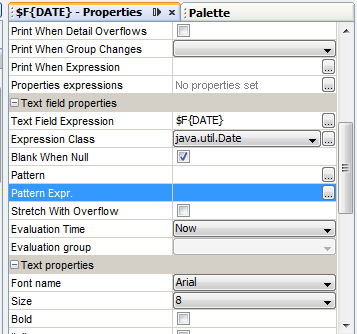
Custom Date format


Sometimes it is required to change date format dynamically.
You can change date format run time dynamically .

  • For same you have to create a Parameter of type java.lang.String and its value can be change at run time.


For example I have created a Parameter DateFormat of type java.lang.String.

  • Go to Pattern Expr.  Property of selected Text Field.

  • Click on right icon to Select Parameter.

  • Now Click on Preview to run your report.
          Pass parameter value as per java recommender Date Format.

Using java SimpleDateFormat

You can also use java SimpleDateFormat to required date format.

Add following expression in Text Field Expression

new SimpleDateFormat(Date_Format).format(Database_field)

where Date_format is Pattern value as per your requirement 
and Database_field is database field which need to be formatted(must be Date data Type).


textField with pattern performers faster than new SimpleDateFormat("Date_Format").format("Database_field"). 
It's important when you have deal with huge reports.

Sep 17, 2015

Use IN clause of sql in jasper ireport

Sometime it is necessary to pass IN clause of sql in jasper ireport.

You can use following syntax

select ... where $X{IN, database_column_name, parameter_name}

parameter_name  is a parameter name  of type Collection or array.
Your parameter to be of type java.util.Collection or java.util.List.

database_column_name is database column name.

With the $X{} syntax, the word IN is the name of the function (the other choice is  NOT IN).