Oct 12, 2012

Association and Association accessor

Relationships between entity object definitions are handled by Oracle ADF associations, which define a relationship between two Oracle ADF entity object definitions based on sets of entity attributes from each.  
Associations map to relationships between single objects in the data source. In the vast majority of cases, these are relationships among tables, views, synonyms, and snapshots in a database.
When the data source is a database, associations often map to foreign key relationships between tables in the database. Although you do not need to actually create a foreign key constraint between tables to create a one-to-one or one-to-many association between the corresponding entity objects, there should at least be an appropriate logical relationship between the tables

1.)Accessor Attributes:-

When you create an association between two entity object definitions, you can elect to add accessor attributes to the source entity object definition, the destination entity object definition, or both.and these accessor attributes function much like other attributes.
Their names can be passed as arguments to EntityImpl.getAttribute(). 
If you generate an entity object class, a getter method for the accessor attributes will be included in the class.
The value of returned by the call to getAttribute() or the getter method depends on the cardinality of the association.

2.)Cardinality:-

Associations can range from simple one-to-many relationships based on foreign keys to complex many-to-many relationships. 
Associations can represent :-
  1. The one-to-many relationship
  2.  The one-to-one relationship
  3. The many-to-many relationship.
The one-to-many and one-to-one relationship work much like foreign key relationships ,i.e., a set of attributes of the source entity object are matched with a set of attributes of the destination entity object definition.
Many-to-many associations are effectively the same as two one-to-many relationships involving the source and destination entity object definitions and a third entity object definition, the intersection.
There are some steps of creating  association:-
 Right click on model and select New option from context menu and select ADF Business Components and then Association option and press ok.
Give the package and Association name and press next.
Now select cardinality and Entity attribute of source and destination entity object and press Add button.
And press next botton.
Now press next 

Press next and Finish.


create a new row in ADF

The 3 different create operations provided by ADF:-
1.)Create:-
This operation opens a slot for a new record in the collection. The new record is added to the collection after the page is submitted.Therefore, if the user abandons the page by navigating away, an empty record is not left orphaned.The new record opened by Create is inserted before the current record in the iterator.

A create operation in the pageDef does the following:
// create a new row for the view object
Row newRow =  viewObject.createRow();
// mark the row as being "initialized", but not yet new
newRow.setNewRowState(Row.STATUS_INITIALIZED);


When we call create and set the status, my adf faces page disables all fields (as if the iterator does not point to the newly created row).

After clicking on Create Button no new row is created in table.


2.)CreateInsert:-
 This operation is the same as Create, except that the new empty record is inserted into the collection as part of the operation.This means that even if the user never submits the page, the row will still be in the collection.

 In addition, if you are using the CreateInsert operation, it performs the additional line of code to insert the row into the row set:
// insert the new row into the view object's default rowset
yourViewObject.insertRow(newRow);

When I call createInsert, my adf faces page reflects the current row as an empty form, when the values are filled out it is commited properly.

 After clicking on CreateInsert Button a new empty row is created.


Note:-Create and CreateInsert, can be a little confusing because they seem to accomplish the same task. The row created by the Create operation is managed as a temporary object by the framework. If the user abandons an
input screen without submitting the new record, the row will simply disappear, leaving the programmer with no clean-up to do. CreateInsert, however, requires clean-up. Although the Create behavior is generally more useful, there are still some circumstances where CreateInsert should be used. Typically, this will be when the side effects of entity object creation are desirable. For example, the create method on the entity object adds information defined as defaults for attributes such as dates and reference numbers. With CreateInsert, this
default information will be visible to the user on the created (blank) record. If the Create operation is used, the defaults will not be set until after the user submits the new record.

3.)CreateWithParams:-
This operation is same as CreateInsert and only difference is that we can assign default values on CreateInsert.

CreateWithParams operation allows us to define parameter to assign it to the new row for some specific attribute.

After clicking on  CreateWithParams button a new row with defalult value of JobId created.


Note:-The ADF BC data control exposes three operations for a view object to create a new row: Create, CreateInsert, and CreateWithParams. The Create operation creates a new row for the collection but doesn’t add it to the iterator. CreateInsert works the same as Create but adds the new row above the current row in the iterator. CreateWithParams works the same as CreateInsert but optionally allows developers to define default values declaratively for the row attributes. The difference between Create and CreateInsert is only relevant if the collection is displayed in a table, not for a form.

Oct 9, 2012

Filtering of data from VO

Sometimes we need to filter View Object data with some condition.

There are different ways of filtering data from View Object.Some of them are:-
1.) setWhereClause:-
        In this method we have to use database table column to add filter.So, we have to get VO and  use
        "setWhereClause" same as  where clause in sql.

      example :-
       Integer empId=4;
       String fName="SCOTT";
       //getting AM
        EmployeesAMImpl am = (EmployeesAMImpl)resolvElDC("EmployeesAMDataControl");
     // getting VO
       ViewObjectImpl emp = am.getEmployee1();
     //filtering data using  setWhereClause
        emp.setWhereClause("employee_id="+empId+" and first_name='"+fName+"'");
        emp.executeQuery();


  In above example employee_id and first_name is database table column and empId and fName is variable to set the value of field.

2.) getFilteredRows :- 
      In this method we have to use VO  column to add filter.So, we have to get VO and  use
      "getFilteredRows" .This method is use to filter for only one column. Method  getFilteredRows return type is Row[].

example:-
        Integer empId=4;
       //getting AM
        EmployeesAMImpl am = (EmployeesAMImpl)resolvElDC("EmployeesAMDataControl");
     // getting VO
       ViewObjectImpl emp = am.getEmployee1();
     //filtering data using  getFilteredRows. As this method returns Row[] type ,so we can use thats row //for our purpose.
Row[] Emprow= emp.getFilteredRows("EmployeeId", empId);


In above example EmployeeId is VO column name and empId  is variable to set the value of field.

3.) RowQualifier:-

In this method we have to use VO  column to add filter.So, we have to get VO and  use    "setWhereClause" method of RowQualifier and  "getFilteredRows"  method of VO for filtering .This method is use to filter on the basis of 1 or more columns.Method  setWhereClause is used to filter data and method  getFilteredRows return type is Row[] after filtering.

example:-
       Integer empId=4;        String fName="SCOTT";
       //getting AM
        EmployeesAMImpl am = (EmployeesAMImpl)resolvElDC("EmployeesAMDataControl");
     // getting VO
       ViewObjectImpl emp = am.getEmployee1();
     // creating RowQualifier
        RowQualifier rowQualifier = new RowQualifier(emp);
     // filtering data using method setWhereClause
        rowQualifier.setWhereClause("EmployeeId="+empId+" AND FirstName="+fName);
   // use method getFilteredRows to return Row[] type after filter.
        Row[] filteredRows = emp.getFilteredRows(rowQualifier);

In above example EmployeeId and FirstName are VO column name and empId and fName are variable to set the value of field.


Note:-  setWhereClause is use to filter data using database column.
            getFilteredRows is use to filter data using VO column name but only one column is use to      filtering of data using this method.
           RowQualifier is use to filter data using VO column name but one or more than one column is use to filtering of data using this method.We have to use both use    "setWhereClause" method of RowQualifier and  "getFilteredRows" method of VO for your purpose.

Aug 6, 2012

Basic of taskflow

ADF task flows provide a modular approach for defining control flow in an application. Instead of representing an application as a single large JSF page flow, you can break it up into a collection of reusable task flows. Each task flow contains a portion of the application's navigational graph.It means if we want to navigate from one page to another.

In simple words,task flow is visual representation of application process flow.Each Task Flow contains portion of application navigation.They are similar to traditional flow charts and its primary purpose is reuse.


Some features of  Task Flow:-

  • The application can be broken up into a series of modular flows that call one another.
  • You can add to the task flow diagram nodes such as views, method calls, and calls to other task flows.
  • Navigation is between pages as well as other activities, including routers.
  • Shared memory scope (for example, page flow scope) enables data to be passed between activities within the task flow. Page flow scope defines a unique storage area for each instance of an ADF bounded task flow.
  • ADF task flows are reusable within the same or an entirely different application. After you break up your application into task flows, you may decide to reuse task flows containing common functionality.
     
Types of task flow:-

The two types of ADF task flow are:
  • Unbounded task flow: A set of activities, control flow rules, and managed beans that interact to allow a user to complete a task. An ADF unbounded task flow consists of all activities and control flows in an application that are not included within any bounded task flow.
    A Fusion web application always contains an ADF unbounded task flow, which contains the entry point or points to the application.
    This task flow contains a number of view activities that are all entry points to the application.

    You typically use an unbounded instead of a bounded task flow if:
    • You want to take advantage of ADF Controller features not offered by bounded task flows.
    • The task flow will not be called by another task flow.
    • The application has multiple points of entry. The task flow can be entered through any of the pages represented by the view activity icons on the unbounded task flows.Pages are associated with view activities. The icon for a view activity displays a page image like this:
      Page image in view activity icon
    •  An unbounded task flow cannot declaratively specify parameters. In addition, it cannot contain a default activity, an activity designated as the first to run in the unbounded task flow. This is because an unbounded task flow does not have a single point of entry. To perform any of these requires an ADF bounded task flow.

  • Bounded task flow: A specialized form of task flow that, in contrast to an unbounded task flow, has a single entry point and zero or more exit points. It contains its own set of private control flow rules, activities, and managed beans. An ADF bounded task flow allows reuse, parameters, transaction management, and reentry.
    A bounded task flow is also known as a task flow definition. By default, JDeveloper proposes the following filename for the source file of a bounded task flow:
    task-flow-definitionN.xml
    where N is a number that increments each time that you create a new bounded task flow.
    The file contains the metadata for the bounded task flow. Multiple task flow definitions (bounded task flows) can be included within the same task flow definition file.

    An ADF bounded task flow is used to encapsulate a reusable portion of an application. A bounded task flow is similar to a Java method in that it:
    • Has a single entry point.
    • May accept input parameters.
    •  May generate return values.
    •  Has its own collection of activities and control flow rules.
    • Has its own memory scope and managed bean lifespan (a page flow scope instance).

    An unbounded task flow can call an ADF bounded task flow, but cannot be called by another task flow. A bounded task flow can call another bounded task flow, which can call another and so on. There is no limit to the depth of the calls.


    ● A typical application contains one unbounded task flow and many bounded task flows.
    ● Build bounded task flows in its own application/workspace.
 Bounded Task flows can:- 
  •    Create with Pages or Page fragments.
  •    Create as Train flows.
  •    Call in a Dialog.

ADF Bounded Task Flow Features:-

Feature   Description
Well-defined          boundary An ADF bounded task flow consists of its own set of private control flow rules, activities, and managed beans. A caller requires no internal knowledge of such things as page names, method calls, child bounded task flows, managed beans, and control flow rules within the bounded task flow boundary. Input parameters can be passed into the bounded task flow, and output parameters can be passed out on exit of the bounded task flow. Data controls can be shared between task flows.


Single point of entry An ADF bounded task flow has a single point of entry, a default activity that executes before all other activities in the task flow.


Page flow memory scope You can specify page flow scope as the memory scope for passing data between activities within the ADF bounded task flow. Page flow scope defines a unique storage area for each instance of an ADF bounded task flow. Its lifespan is the ADF bounded task flow, which is longer than request scope and shorter than session scope.

Addressable You can access an ADF bounded task flow by specifying its unique identifier within the XML source file for the bounded task flow and the file name of the XML source file.

Reuse You can identify an entire group of activities as a single entity, an ADF bounded task flow, and reuse the bounded task flow in another application within an ADF region. For example, the Hot Items and Start Shopping tabs on the home page of the Fusion Order Demo application reuse the same task flow embedded in a region. Different parameters are passed to each region to determine the lists of products that display.
You can also reuse an existing bounded task flow simply by calling it. For example, one task flow can call another bounded task flow using a task flow call activity or a URL.
In addition, you can use task flow templates to capture common behaviors for reuse across different ADF bounded task flows.

Parameters and return values A caller can pass input parameters to an ADF bounded task flow and accept return values from it.In addition, you can share data controls between bounded task flows.

Transaction management An ADF bounded task flow can represent a transactional unit of work. You can declaratively specify options on the bounded task flow that determine whether, when entering the task flow, the task flow creates a new transaction, joins an existing one or is not part of the existing transaction.

Reentry You can specify options on the bounded task flow that determine whether or not it can be reentered.

On-demand loading of metadata ADF bounded task flow metadata is loaded on demand when entering an ADF bounded task flow.

Security You can secure an ADF bounded task flow by defining the privileges that are required for someone to use it.


 A typical application is a combination of an unbounded and one or more bounded task flows. For example, JDeveloper, by default, creates an empty unbounded task flow (source file name is adfc-config.xml) when you create a Fusion web application using the Fusion Web Application template. At runtime, the Fusion web application can call bounded task flows from activities that you added to this unbounded task flow.


Page vs Page Fragment :-

Page Fragment :-
●Renders as content in another JSF page 
●Must not contains the af:document ,af:form ,f:view, head, body and html because JSF page already has it.
● has .jsff extension 

 Page:-
●can contains many fragments.
●extension .jsf or .jspx

Task flow Regions:- 

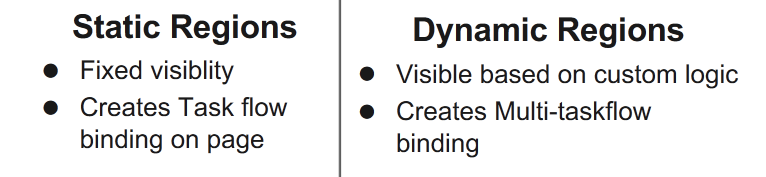
Regions are created when you drag and drop a bounded task flow on a page.


Task Flow Managed Bean Scopes :-


Task Flow Components :-


Note:-  Task flow name and page name should be unique for a project.